Managed Defense Newsletter • 11 Min READ
Managed Defense Threat Insights: January 2026 Newsletter
Feb 2026



Cyber Defense Center
Critical IIS Server Compromise via Telerik Web UI Vulnerability
Detection: Use Case generated for usage of certutil to download payload on affected server.
Description: Threat actors have been seen actively attacking vulnerable IIS servers by taking use of a known vulnerability in Telerik UI for ASP.NET AJAX, which is tracked as CVE-2019-18935. The exploit makes use of the endpoint’s unsafe deserialization.
Attackers can upload and run any code on the compromised IIS server by taking advantage of this vulnerability, which results in remote code execution (RCE). Adversaries can obtain an initial foothold, launch web shells, carry out malicious payloads, and possibly move laterally inside the environment if exploitation is successful.
In observed incident, threat actors abused the vulnerable WebResource.axd handler to bypass authentication controls and execute malicious commands under the context of the IIS application pool. This often resulted in persistent access, unauthorized file uploads, and follow-on activity such as credential harvesting or deployment of additional malware.
Recommendations: To strengthen the overall security posture, SecurityHQ IR team recommended Immediately patch Telerik UI to a fixed version provided by the vendor. The team provided all available Indicators of Compromise (hashes) to be blocked in Trend Micro and also shared detection criteria for identifying similar instances, recommending the creation of a custom detection rule in other EDR tools.
Lessons Learnt: Organizations should patch unpatched critical vulnerabilitites immediately. IIS web servers hosting public applications are attractive targets for attackers. Third-Party Components Require the Same Patch Discipline as OS Updates. Continuous monitoring and hardening of these assets are essential. Enforcing least-privilege access (e.g., restricting write access to application folders) can significantly reduce attacker capabilities.
SharePoint & E-Signing Phishing Emails Impersonate Trusted Services to Steal Credentials
Detection: Client reported possible BEC attack due to suspicious email sent to vendors with SOC monitoring handled by other MSSP.
Description: The attackers impersonated widely used file-sharing and electronic signature services, including SharePoint and e-signing platforms, crafting emails that closely mimicked legitimate notifications — complete with official-looking logos, headers, and “Review Document” buttons — to increase authenticity.
To evade detection and increase trust, all malicious links were routed through trusted redirect services (most commonly Mimecast’s secure-link rewriting domain), making the URLs appear legitimate to both users and automated filtering systems.
The campaign primarily impacted sectors that routinely exchange contracts and financial documents — including consulting, technology, construction/real estate, healthcare, finance, manufacturing, media/marketing, transportation/logistics, energy, education, retail, hospitality/travel, and government — underscoring the effectiveness of this social engineering technique at scale.
Recommendations: Enforcing secured MFA methods for authentication instead of Text or Call methods. Revoking all active sessions and password reset for affected users. Lastly, user awareness and phishing training were suggested to all end users.
Lessons Learnt: Impersonation policy between sister companies wasn’t in place, bypassing users and automated filters. Multi-layered defenses, including MFA, email security controls, and user awareness, are essential to reduce compromise risk.
Threat Detection Engineering
New Detections for this Month
Use Case generated for usage of certutil to download payload on affected server led to identification of potential vulnerability exploitation associated with Telerik that led Threat Detection Engineering team to create specific detection use cases as below:
Telerik Exploitation
This detection identifies potential exploitation of vulnerabilities in Telerik UI for ASP.NET through malicious POST requests to the WebResource endpoint, often abusing the type=rau parameter to upload malicious files or trigger unsafe deserialization.
Successful exploitation may lead to remote code execution, deployment of web shells, persistent unauthorized access, lateral movement within the network, and potential exposure of sensitive data, making early detection critical to preventing full server compromise and operational disruption.
Detection Name: (AUTO) Global: Exploit: Telerik Exploitation Attempt Detected (P2)
Deserialization of Untrusted Data vulnerability in Sitecore Experience Manager (XM)
CVE-2025-53690 is a critical security vulnerability affecting multiple Sitecore products, including Sitecore Experience Manager (XM), Experience Platform (XP), and related components through version 9.0. It stems from a deserialization of untrusted data flaw that allows attackers to execute arbitrary code remotely.
This vulnerability occurs when Sitecore improperly handles serialized .NET objects—specifically via ViewState deserialization allowing maliciously crafted inputs to be deserialized in a way that results in remote code execution (RCE)
Detection Name: (AUTO) Global: Exploit: Deserialization in Sitecore Experience Manager Detected (P3)
Threat Management
SecurityHQ’ s Threat Management Team manages various endpoint security, cloud security and network security solutions for customers. Following section highlights some key security insights.
Malware Campaign Leveraging Fake PDF Applications
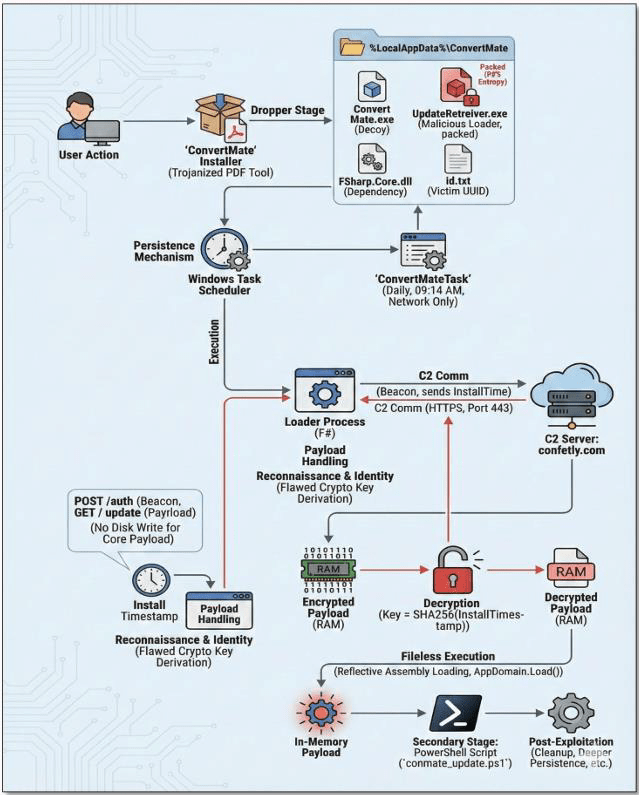
Since November 2025, a widespread malware campaign has been observed targeting organizations through trojanized PDF editor applications. Truesec has identified several malicious programs most notably ConvertMate, PDFClick, and PDFSkillsApp that impersonate legitimate PDF utilities while serving as initial access vectors for malware delivery.
These applications are distributed via attacker-controlled domains promoted through online advertisements. Upon installation, the malware executes a multi-stage infection chain, including outbound network communications, host reconnaissance, and persistence mechanisms. Persistence is achieved through scheduled tasks configured to execute at 24-hour intervals. The malware subsequently communicates with hardcoded command-and-control (C2) infrastructure, enabling long-term access and follow-on malicious activity.
Internal Incident Summary :
Our SOC observed a confirmed incident, when Windows Defender for Endpoint detected and blocked the malicious file “UpdateRetreiver.exe” (categorized as ‘Malgent’ malware). The file hash matched Truesec’s published indicators of compromise, confirming the infection originated from the ConvertMate application installed in the user’s AppData directory. Following established incident response procedures, the affected host was isolated, and remediation steps including system re-installation and credential resets were initiated. As a reminder to all staff: exercise caution when downloading software particularly free PDF tools advertised online and always verify applications through official channels before installation.
SecurityHQ Recommendation: Strengthen Third-Party Application Controls
In response to this ongoing threat, SecurityHQ strongly recommends hardening your third-party application usage policy to block or control unauthorized software within your environment. Implementing application control significantly improves your security posture by preventing users from installing potentially malicious utilities. Organizations can leverage Windows AppLocker for on-premises control or Microsoft Defender Cloud Apps Policy for cloud-based management.
Steps to Block 3rd pary PDF edditors using Cloud Apps Policy :
Method 1. Block from Cloud App Catalog
- In Microsoft Defender Portal, navigate to Cloud Apps → Cloud app catalog
- Search for the application you want to block (e.g., ConvertMate, PDFClick, and PDFSkillsApp)
- Click the three dots (⋮) at the end of the app row
- Select Unsanctioned
- The app will be automatically synced to Defender for Endpoint and blocked on managed devices
Method 2. Block from Discovered Apps
- Navigate to Cloud Apps → Cloud Discovery → Discovered apps
- Review discovered applications and their risk scores
- Click the app name to view details including users, traffic, and risk factors
- Click Unsanctioned to block the application
- Optionally, select Monitored first to track usage before blocking.
Threat Hunting
SecurityHQ’ s Threat Hunting team conducted hunts focused on general account activities seen in the customer’s environment. Following section highlights hypothesis, hunts and top actions recommended to the customers.
Hypothesis:
Unmanaged or shared endpoints are being used as an entry point to misuse valid credentials, execute unauthorized scripts, establish persistence, and potentially stage or exfiltrate data via removable media or exposed network services.
This hunt assumes that attackers (external or insider) may be living off the land, leveraging legitimate user access, common utilities, and poor endpoint controls rather than deploying overt malware.
Context:
The threat hunt focused on identifying indicators of credential misuse, unauthorized execution, and persistence attempts originating from unmanaged or shared endpoints. Such devices reduce user accountability and increase the likelihood of malicious activity remaining undetected.
The investigation analyzed authentication patterns, network exposure, script execution, download behavior, USB usage, and security control enforcement across the environment. Particular attention was given to behaviors commonly associated with initial access, post-exploitation, lateral movement, and data staging, while avoiding reliance on traditional malware signatures.
The presence of multiple users authenticating from the same endpoint, internet-exposed authentication services, execution of scripts from user-writable directories, and unrestricted file transfer via removable media suggests potential abuse of legitimate credentials and tools. These behaviors collectively align with insider threat scenarios, credential compromise, or early-stage intrusion activity, warranting deeper investigation and control validation.
Threat Hunting Approaches
- Identity behavior analysis across endpoints: Authentication patterns were reviewed to identify multiple users authenticating from the same device and non-admin users authenticating from an unusually high number of devices, as deviations from normal user-device relationships reduce accountability and increase the risk of credential misuse.
- Internet-exposed authentication monitoring: Authentication attempts originating directly from the internet were analyzed, including the use of high-risk protocols such as SMB, as externally exposed authentication services significantly increase susceptibility to brute-force attacks and unauthorized access.
- Script execution from user-controlled locations: Execution of batch and PowerShell scripts from user-writable paths such as Downloads was reviewed, as these locations are frequently abused for reconnaissance, automation, and execution of malicious logic using trusted tools.
- File download source analysis: Download activity from social media, chat platforms, freeware, cloud storage, generative AI, and foreign-hosted websites was analyzed, as these sources are commonly leveraged for delivery of trojanized tools and untrusted payloads.
- Removable media usage and file transfers: USB and external storage activity was reviewed to identify frequent connections and file transfers, as removable media remains a common vector for data staging, exfiltration, and malware introduction outside network visibility.
- Security control interaction analysis: Attack Surface Reduction rule telemetry was analyzed to identify blocked or attempted risky behaviors, as these events often highlight early abuse attempts even when controls successfully prevent execution.
Recommendations: Based on the observed threat landscape, the following actions are recommended:
- Enforce conditional and device-based access controls to limit authentication from unmanaged or shared endpoints.
- Restrict script execution from user-writable directories and apply tighter PowerShell policies for non-admin users.
- Eliminate or tightly control internet-exposed authentication services, especially SMB.
- Strengthen controls and monitoring around removable media usage and bulk file transfers.
- Use ASR rule hits as proactive hunting signals rather than relying solely on alert severity.
Incident Response – Success Story
Targeted Intrusion Campaign Against Indian Financial Sector
Overview
We are monitoring a targeted cyber intrusion campaign affecting organizations in India’s Financial Services sector. The activity demonstrates advanced, manual attacker behavior and sustained access rather than opportunistic or automated attacks.
Based on observed behavior, the campaign is assessed with moderate confidence to align with China-nexus state-linked threat activity, consistent with tradecraft previously associated with APT41.
What Happened
Attackers gained access by exploiting vulnerable internet-facing web applications, primarily hosted on Microsoft IIS servers. Once inside, they established persistent, stealthy access and moved laterally across server environments.
The attackers avoided traditional malware and instead relied on legitimate system tools and commercial cloud infrastructure, allowing their activity to blend into normal operations and evade basic security controls.
Why This Matters
- High-risk sector targeting: Financial services are being deliberately selected, indicating strategic rather than criminal objectives.
- Stealth and persistence: The attackers prioritize long-term access, limiting detection and increasing potential business impact.
- Elevated access: Compromised systems often resulted in administrator-level control, increasing the risk of widespread disruption or data exposure.
- Unclear intent: No evidence of ransomware, extortion, or data leaks has been observed, suggesting intelligence gathering or strategic positioning.
Key Observations
- Use of compromised web servers as an entry point and long-term foothold
- Creation of unauthorized administrator accounts and deliberate log deletion
- Controlled movement between internal servers, avoiding noisy or indiscriminate spread
- Use of trusted cloud platforms (e.g., AWS, DigitalOcean) for command-and-control, complicating detection
Threat Actor Attribution (Assessment):
Based on the cumulative TTPs observed, this activity is assessed with moderate confidence to be associated with China-nexus advanced persistent threat operations, closely aligning with tradecraft attributed to APT41.
Attribution Rationale:
- Webshell-driven persistence on IIS servers
- Heavy reliance on LOLBins over custom malware
- Controlled lateral movement using Admin$ and SQL Server
- Credential dumping and local admin account creation
- Masquerading of binaries and log clearing
- Abuse of mainstream cloud infrastructure for C2
Attacker’s motive remains unclear: As no evidence of data encryption, extortion demands, data leakage, or underground forum disclosures has been observed to date.
Recommended Actions:
- Prioritize patching and security hardening of all internet-facing applications
- Ensure least-privilege access for web and application services
- Mandate centralized logging and monitoring, including alerts for log deletion
- Review administrative access controls, including local admin accounts and server-to-server access
- Limit outbound server connectivity to approved business destinations only
- Confirm incident response readiness, including executive escalation procedures