Managed Defense Newsletter • 11 Min READ
Managed Defense Threat Insights: February 2026 Newsletter
Mar 2026



Cyber Defense Center
Exposed Virtual Machine on Azure was enumerated by attackers
Detection: Use Case generated for login attempts from “non-compliant” host as well as Login failure for high privileged account”KRBTGT”
Description: Threat actors have been observed actively scanning the internet for exposed hosts by targeting port 3389. Once such hosts are identified, they attempt brute-force attacks using commonly used generic accounts, including highly privileged accounts such as KRBTGT.
Through early detection of brute-force activity and identification of a non-compliant host, the team was able to locate the exposed system and validate its exposure using OSINT platforms.
Recommendations: It is recommended to block Inbound Port 3389 communication across all perimeter boundaries and NSGs. Please verify that no production VMs have publicly exposed to management ports. Authentication controls should be strengthened by implementing account lockout thresholds, enforcing strong password policies, and disabling unused local accounts.
Abuse of Legitimate Services (Box and Trello) for Phishing and Malicious Document Distribution
Detection: SOC identified potential account takeover activity and suspicious inbox rule creation.
Description: Multiple users received emails inviting them to collaborate on Box. When users clicked the link, they were prompted to reset their passwords. Subsequently, a file was presented on Box which, when accessed, redirected users to a page requesting Microsoft credentials.
Through this technique, the attacker gained access to user email accounts. The attacker then read and downloaded multiple emails and created inbox rules to automatically move emails with subjects containing the keyword “Box” to the “Conversation History” folder and mark them as read, thereby hiding the activity from users. This was followed by additional phishing emails requesting collaboration on different Box files, indicating lateral phishing attempts.
A new tactic observed during this phishing campaign involved the attacker uploading malicious files to SharePoint, leveraging trusted internal platforms to propagate the attack within the organization.
A similar phishing trend has also been observed using the Trello platform, suggesting abuse of multiple legitimate collaboration services to bypass user suspicion and security controls.
Recommendations: Enforce MFA for all user. Ensure conditional access policies covering MFA for all orgnisation users. Regularly review and audit mailbox rules. Conduct periodic user awareness training focused on collaboration-based phishing
Threat Detection Engineering
New Detections for this Month
Behavior Analytics Detection for User
This detection leverages MS Sentinel’s Behavior Analytics insights to identify high-risk authentication anomalies where a user logs in for the first time from a new country, uses a new browser, and accesses an application for the first time without a registered device context.
Security Impact:
- Detects potential account takeover attempts
- Identifies suspicious login behavior
- Flags reconnaissance using compromised credentials
Detection Name: Authentication: Behavior Analytics Detection for User.
OAuth Device Code Flow Abuse Detection
This detection identifies suspicious use of OAuth Device Code authentication flow where no device ID is recorded, and Microsoft Graph is accessed. Device Code Flow is often abused in phishing campaigns, token theft, and consent grant abuse scenarios.
Security Impact:
- Detects OAuth abuse techniques
- Helps prevent token-based account compromise
- Enhances visibility into API-based access misuse
Detection Name: Authentication: OAuth Device Code Flow Abuse Detection.
MSXDR: Lotus Blossom Suspicious Network Connection
This detection monitors suspicious outbound network connections initiated by gup.exe to non-approved external URLs and public IP addresses. Events are enriched with geolocation context to enhance investigation.
Security Impact:
- Identifies Command-and-Control (C2) communications
- Detects malware staging activity
- Flags suspicious updater abuse scenarios
Detection Name: Malware: Windows: Lotus Blossom: Suspicious Network Connection Detected.
Windows Suspicious Binary Spawning
This detection identifies suspicious process spawning behavior initiated by gup.exe, excluding known legitimate processes. It correlates unique SHA256 hashes with network activity to detect advanced execution chains.
Security Impact:
- Detects malware execution chains
- Identifies secondary payload execution
- Enhances detection of persistence mechanisms
Detection Name: Malware: Windows: Suspicious Binary Spawning Detected.
Threat Management
SecurityHQ’ s Threat Management Team manages various endpoint security, cloud security and network security solutions for customers. Following section highlights some key security insights.
Attackers Abuse Microsoft 365 Direct Send to Deliver Internal Phishing Emails
What is Direct Sent :
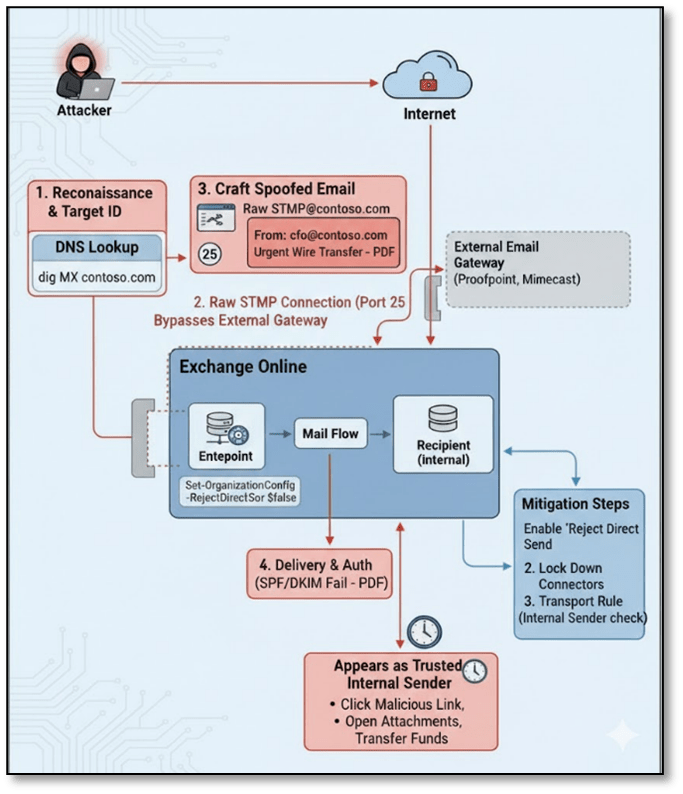
Direct Send is a Microsoft 365 (Exchange Online) feature that allows applications, printers, multi-function devices, and line-of-business systems to send email by connecting directly to Exchange Online over SMTP. Unlike authenticated SMTP (SMTP AUTH), Direct Send does not require a username or password it relies solely on the sender’s IP address being permitted.
Microsoft officially supports this method as a low-friction approach for on-premises devices and legacy applications that need to send alerts, notifications, or reports. The feature works by routing SMTP traffic directly to an organisation’s Exchange Online MX endpoint.
How Attackers Exploit Direct Sent :
When an attacker obtains or identifies a target organisation’s MX record (publicly available via DNS), they can abuse Direct Send to relay spoofed emails through Microsoft’s own Exchange Online infrastructure. Because no authentication is required, the attacker can set any “From” address including legitimate internal employee addresses making the email appear to originate from inside the organisation.
SecurityHQ Recommendations:
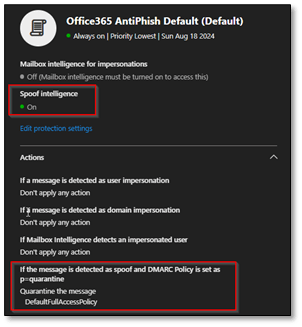
Method 1. Configure Anti-Spoofing Policy in Microsoft Defender
- Navigate to Microsoft Defender Portal (security.microsoft.com) > Email & Collaboration > Policies & Rules > Threat policies
- Select Anti-phishing and click the default policy or create a new policy
- Under ‘Spoof’ settings, ensure ‘Enable spoof intelligence’ is toggled On
- Set ‘If message is detected as spoof’ to Quarantine or Move to Junk (recommended: Quarantine for high- risk senders)
- Save and apply the policy to all users or targeted groups
Method 2. Create a Transport Rule on Exchange Online
Example Conditions
- Sender is located outside the organization
- Sender’s domain matches your internal domain (e.g @yourcompany.com)
Actions: Quarantine the message
Exceptions:
- If the message is received from a specific IP range or any inbound connector (your third-party filtering service) configured in your environment.
- If the sender is a known service account or relay
Additional Settings:
- Audit this rule for visibility in message trace and reporting
- Enable rule mode: Enforce (not test mode)
Threat Hunting
SecurityHQ’ s Threat Hunting team conducted hunts focused on general account activities seen in the customer’s environment. Following section highlights hypothesis, hunts and top actions recommended to the customers.
Hypothesis:
A trusted software update mechanism for Notepad++ (gup.exe) may have been abused to deliver or execute unauthorized code, where the updater-initiated network connections to unexpected external destinations, downloaded or dropped untrusted binaries, spawned anomalous child processes, and potentially established follow-on network communication indicative of command-and-control or secondary payload execution.
Context:
The threat hunt focused on identifying indicators of potential abuse of the Notepad++ update mechanism, specifically examining whether the trusted updater process (GUP.exe) was leveraged to execute unauthorized code, establish persistence, or initiate malicious outbound communication. Because software update utilities are inherently trusted and commonly allowed through security controls, their misuse can enable stealthy execution with reduced user suspicion.
The investigation analyzed process execution chains, child process spawning behavior, outbound network connections, file creation and modification events, DLL loading activity, and security control telemetry across the environment. Attention was given to deviations from expected update workflows, including connections to non-standard domains, execution of binaries from user-writable directories, anomalous process lineage, and network activity originating from updater-spawned processes. The hunt emphasized behavioral inconsistencies rather than reliance on static malware signatures.
Indicators such as abnormal execution chains originating from notepad++.exe, GUP.exe spawning unexpected child processes, connections to unapproved or high-risk external infrastructure, suspicious DLL side-loading patterns, and file drops outside standard installation paths may collectively suggest exploitation of the update mechanism as an initial access or proxy execution vector. These behaviors align with software supply chain abuse, trusted binary proxy execution, and early-stage command-and-control establishment, warranting deeper investigation and validation of application control, network filtering, and update integrity controls.
Threat Hunting Approaches
- Execution chain integrity analysis across endpoints:
Process lineage was reviewed to validate expected parent-child relationships originating from Notepad++ and its updater component (GUP.exe). Focus was placed on identifying deviations from the normal execution flow (notepad++.exe → gup.exe → update.exe), as abnormal branching into scripting engines, system utilities, or unrelated executables may indicate proxy execution under a trusted application context and potential compromise of the update workflow. - Compromised update traffic monitoring:
Outbound network connections initiated by GUP.exe were analyzed to determine whether update traffic resolved to legitimate and historically observed infrastructure. Connections to non-whitelisted domains, direct IP-based communication, anomalous geolocations, or newly observed external destinations were reviewed, as manipulation of update traffic can enable delivery of unauthorized payloads while blending into legitimate HTTPS activity. - Unauthorized child process spawning behavior:
All processes spawned by GUP.exe were evaluated to detect execution of command interpreters, living-off-the-land binaries (LOLBins), or executables launched from user-writable directories. Since update utilities should execute only controlled installer components, deviations from expected child process behavior may signal abuse of the updater as an execution proxy for malicious code. - Network activity originating from spawned binaries:
Network telemetry associated with binaries launched by GUP.exe was correlated to identify potential secondary payload retrieval or command-and-control communication. Non-browser processes initiating outbound HTTPS sessions, repeated beacon-like intervals, or communication over uncommon ports were examined, as these behaviors may represent post-exploitation activity following initial execution. - Suspicious file creation and modification review:
File system events triggered by GUP.exe were analyzed to identify executable or DLL drops outside standard installation directories. Attention was given to files written to AppData, Temp, ProgramData, or other user-controlled paths, as such locations are commonly used for staging payloads or establishing persistence. File creation events immediately followed by execution were treated as elevated risk indicators. - Security control telemetry correlation:
Endpoint protection and application control logs were reviewed to determine whether update-related activity triggered antivirus detections, execution blocks, or policy enforcement events. These signals provide insight into attempted abuse, even when controls successfully prevent full execution, and help differentiate benign update behavior from blocked malicious activity. - Known IoC and hash validation:
Network destinations and file hashes associated with update activity were cross-referenced against known threat intelligence indicators. Matches to known malicious domains, IP addresses, or SHA256 values were treated as high-confidence compromise signals. Even in the absence of direct matches, behavioral anomalies were assessed to account for potentially novel or modified infrastructure used by adversaries.
Recommendations: Based on the observed threat landscape, the following actions are recommended:
- Validate and Standardize Notepad++ Installations
- Identify all endpoints with Notepad++ installed, including version and installation path.
- Verify that all instances are running the latest official, patched version obtained from trusted sources (official Notepad++ site or verified GitHub releases).
- Replace or reinstall any instances where:
- Version is outdated or unsupported
- Installation source cannot be validated
- Binary Hashes do not match known-good releases
- Restrict plugin installation to approved plugins only.
- Remove unused or legacy plugins that may introduce additional risk.
- Remove Notepad++ from systems where it is not business-justified.
Incident Response – Success Story
Illicit OAuth App Consent Phishing
Overview
An Illicit OAuth App Consent phishing attack targeted the user [email protected] (anonymized name), leveraging an Adversary-in-the-Middle (AiTM) technique to capture an active authentication session. SecurityHQ IR team was involved in this incident in a later stages of the attack. The compromise resulted in unauthorized access to Microsoft 365 services, MFA manipulation, and mailbox data enumeration. Incident response ensured that the impact was limited and policies were hardened to prevent similar incidents.
What Happened
The attack began when the user clicked a malicious URL embedded in a phishing email.
Upon clicking the link:
- The user was initially redirected through legitimate security gateways:
- Outlook Safelink
- Microsoft SmartScreen
- Mimecast Protection
- Despite multiple security warnings, the user manually overrode all warning pages.
- After bypassing the protections, the user was redirected through the following malicious infrastructure chain:
- hxxps[:]//raspy-sea-7139[.]sadiri1121-7b0[.]workers[.]dev
- cforca[.]group
- challenges[.]cloudflare[.]com
- autologon[.]microsoftazuread-sso[.]com
All redirections occurred within an active Microsoft Edge (msedge) session on the host.
Because the user already had an authenticated Microsoft session in the browser, the phishing infrastructure was able to intercept and capture the authentication session token — successfully executing an Adversary-in-the-Middle (AiTM) attack.
To maintain persistence, the attacker:
- Reused the same session ID
- Accessed:
- OfficeHone
- My Profile
- My Sign-ins
- One Outlook Web
- Added a new MFA device labeled “NO_DEVICE”
Threat Actor Attribution (Assessment):
The infrastructure and attack pattern strongly align with modern AiTM phishing kits such as:
- Evilginx-style reverse proxy frameworks
- OAuth token harvesting phishing campaigns
- Cloudflare Workers–hosted phishing redirectors
- Use of:
- Cloudflare challenge pages
- Azure AD SSO lookalike domains
- Malicious SharePoint-themed phishing landing page
- Session replay activity post-authentication
This suggests an organized phishing-as-a-service (PhaaS) operation rather than a targeted state-sponsored campaign. Attribution remains financially motivated cybercriminal activity leveraging AiTM phishing infrastructure.
SecurityHQ IR team successfully responded to the incident thereby limiting the impact, and carried out necessary response actions including hardening of existing security controls to prevent future reocurrences.
Here are key Strategic Controls that can prevent similar incidents in your environment:
- Enable token protection policies
- Restrict MFA device registration
- Implement impossible travel detection tuning
- Deploy Defender for Cloud Apps session control
- Monitor for AiTM indicators (reverse proxy patterns, Cloudflare Worker abuse)
The redirection sequence:
Workers → cforca.group → Cloudflare challenge → azuread-sso lookalike → malicious SharePoint
This is a professionally designed phishing flow, not a low-effort scam.
Authors