
Managed Defense Newsletter
Managed Defense Threat Insights: April 2026 Newsletter
Cyber Defense Center – Highlights
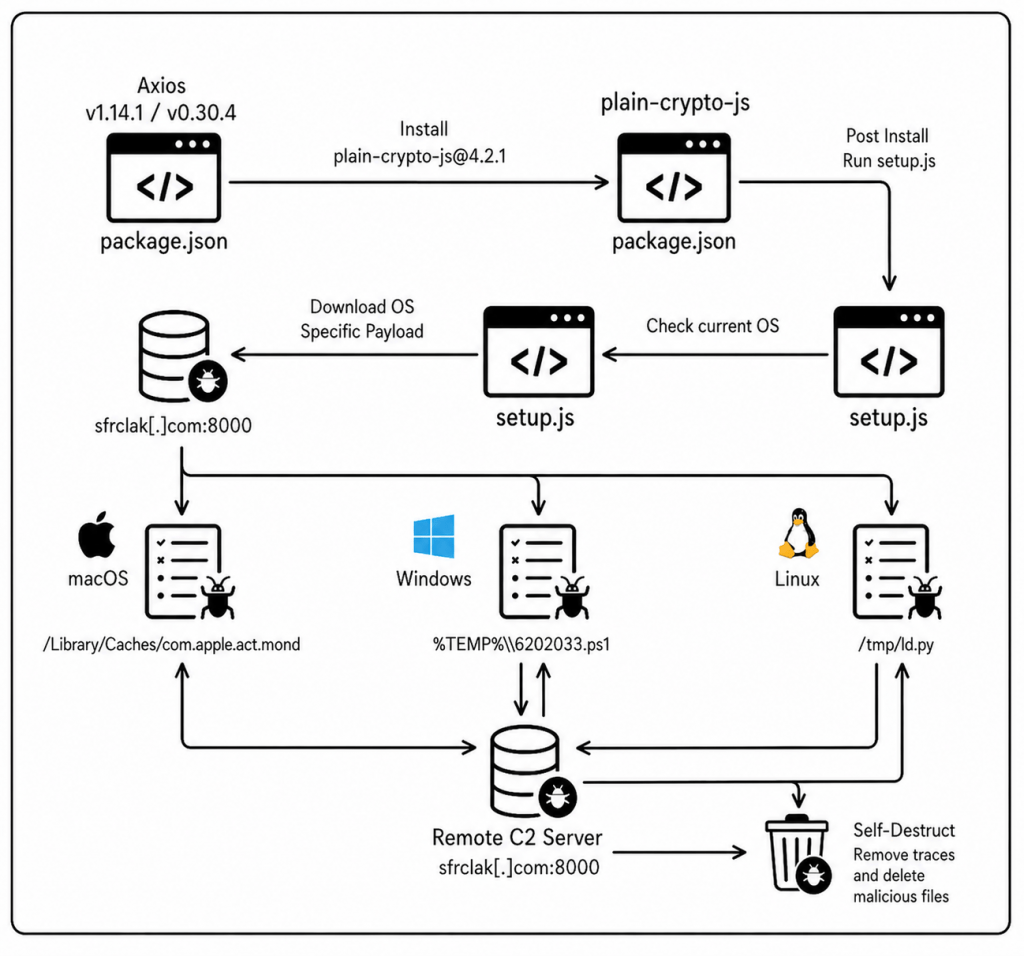
Supply Chain Attack via compromised Axios npm Package
Detection: A number of incidents were raised based on observed behavior; however, most detections were straightforward signature and IOC-based alerts generated by the EDR/Firewall logs for C2 connection. One detection was behavior-based, where the legitimate Windows file wt.exe was executed from a non-standard path.
Description: A supply chain attack targeted the widely used Axios package, where a compromised version included a malicious postinstall script that executed automatically during installation. This script downloaded a trojanized archive (plain-crypto-js-4.2.1[.]tgz) and deployed a cross-platform Remote Access Trojan (RAT) on the affected system. Once executed, the RAT identified the victim’s operating system by leveraging an impersonated Microsoft binary (wt.exe) and established communication with a command-and-control (C2) server at sfrclak[.]com, enabling potential remote access and data exfiltration. To evade detection and hinder forensic analysis, the malware performed anti-forensic actions such as deleting the dropper after execution and replacing the malicious package.json file with a clean version, effectively removing traces of the compromise.
Recommendations: Downgrade Axios to a safe version (1.14.0 or 0.30.3), remove plain-crypto-js from node_modules, inspect systems for RAT artifacts such as wt.exe, ld.py, and com.apple.act.mond, rotate all credentials, and block all IOCs.
Lessons Learnt: Third-party dependencies are a major attack vector. Supply chain security must be proactive; Regular dependency audits are critical and Version pinning reduces exposure to malicious updates. Least privilege and network controls help limit damage even if a package is compromised. Organizations should adopt zero-trust principles for external code and dependencies
Threat Detection Engineering
Detections of the Month
Enhanced Protection Against Unauthorized Credential File Tampering
Rule Name: Shadow File Direct Modification Detected
We have introduced a new detection mechanism to identify and prevent direct unauthorized modifications to the /etc/shadow file, a critical system file that stores hashed user passwords in Linux environments.
- High-risk command patterns are prioritized to ensure rapid investigation and response
- System activity is continuously monitored for suspicious commands attempting to modify the shadow file (e.g.,
sed -i,echo >,tee,cp,mv) - Any direct interaction with
/etc/shadowoutside of approved system utilities is immediately flagged
From ClickFix to Credentials Theft: Defeating the Latest Stealer & Loader Tactics
This enhancement significantly reduces the risk of:
- Unauthorized privilege escalation through password manipulation
- Backdoor account creation or credential tampering
- Persistence mechanisms established by attackers modifying authentication data
- Compromise of system integrity and user authentication controls
Improved Detection of OAuth Abuse (Device Code Flow Attacks)
Rule Name: Microsoft OAuth AITM Detected
We have also strengthened visibility into OAuth-based authentication abuse, particularly targeting the Device Code Flow.
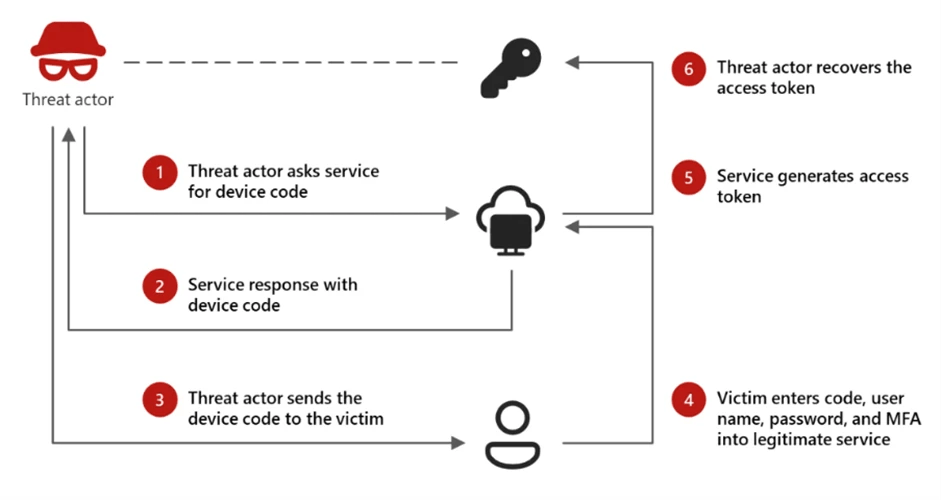
These detections enhances visibility into:
- Suspicious authentication attempts using device codes
- Unauthorized access attempts to applications (e.g., Microsoft Graph)
Early detection enables faster containment of compromised sessions
- This helps protect against:
- Abuse of trusted authentication mechanisms
- Unauthorized account access without password compromise
- Persistent attacker sessions
Enhanced SQL Security Monitoring
Rule Name: SQL Role Change Activity Observed
Detects potential privilege escalation or unauthorized access changes by monitoring SQL statements such as:
GRANT CONTROL, GRANT ALTER ANY LOGIN, ALTER SERVER ROLE, ALTER ROLE, sp addsrvrolemember, and assignments to privileged roles such as sysadmin or db_owner.
Rule Name: Alter SQL Auditing Logs Observed
Identifies attempts to tamper with SQL audit mechanisms by tracking statements such as:
ALTER SERVER AUDIT, DROP SERVER AUDIT, ALTER DATABASE AUDIT SPECIFICATION, DROP DATABASE AUDIT SPECIFICATION, or disabling auditing using STATE = OFF.
These detections enhance visibility into:
• Privileged access changes
• SQL audit log tampering attempts
• Insider threat activity
• Defense evasion behavior
These detections provide improved visibility into critical SQL administrative activities that could indicate privilege escalation, unauthorized access changes, or attempts to disable audit logging.
Improved Approach
These enhancements are part of our continuous effort to stay ahead of evolving threats and ensure your environment remains secure.
Our SOC team is actively monitoring these detections and will respond promptly to any identified risks, minimizing potential impact on your business
Threat Management
AI Security: Reducing Data Exposure to GenAI Applications via EDR
How SecurityHQ’s Threat Management Team is configuring SentinelOne, Microsoft Defender for Endpoint, and CrowdStrike Falcon to stop sensitive data leaking into ChatGPT, Gemini, DeepSeek, and the long tail of Shadow AI.
The Numbers That Matter

The Numbers That Matter
The Threat Management Team is observing a sharp rise in sensitive data including source code, customer PII, financial records, and credentials being sent to third-party GenAI tools from managed endpoints. Recent industry data suggests that up to 15% of employees regularly paste corporate data into LLMs, with over 25% of those instances containing regulated or proprietary information.
Exposure vectors include:
- Personal accounts on corporate devices — Activity occurs outside tenant-level visibility.
- Browser-based prompts — Employees paste proprietary content directly into chat interfaces.
- File uploads to GenAI platforms — a single click can exfiltrate hundreds of MB.
- Desktop AI clients — ChatGPT, Claude, Cursor, Copilot, bypass browser-centric controls.
- AI browser extensions — Silently scrape internal SaaS page content (Salesforce, ServiceNow, M365).
- Developer tools — IDE plugins and terminal assistants send file contents to third-party LLM backends.
Why it’s dangerous: GenAI tools pose a major data leak risk, as sensitive inputs may enter public models and be exposed to others. They also reveal business insights while bypassing traditional web filters. With many users ignoring restrictions, activity shifts to unmonitored “Shadow AI” making endpoint-level controls essential for visibility and security.
Where We’re Focusing Our EDR Configuration
Threat Management Team is prioritising three OWASP Agentic Top 10 risks where EDR can make a real difference today:
- ASI05 — Unexpected Code Execution: behavioural detection of agent-spawned child processes and script interpreters.
- ASI02 — Tool Misuse: anomaly rules for destructive file operations, shell commands, and mass network connections originating from agent processes.
- ASI04 — Agentic Supply Chain: application inventory of MCP servers, IDE plugins, and desktop AI agents; blocklisting unapproved binaries.
EDR Vendor-Specific Recommendations
The following controls are currently generally available in each platform and have been validated across managed customers. Deploy in stages: Monitor → Warn → Block, with sanctioned agents explicitly allowed first.
| SentinelOne Singularity | Defender for Endpoint | CrowdStrike Falcon |
|---|---|---|
|
Behavioural AI / Storyline engine: · Singularity Core+ Application Control / Blocking: · Singularity Control Firewall Control: · Singularity Control Deep Visibility / PowerQuery: · Singularity Complete |
EDR + ASR rules: · MDE P1/P2 MDA Cloud App Catalog — Generative AI: · Requires Defender for Cloud Apps Custom URL/Domain Indicators: · MDE P1/P2 Advanced Hunting (KQL): · MDE P2 |
Falcon Insight EDR + IOA rules: · Falcon Insight Falcon Firewall Management: · Firewall Management module Falcon Exposure Management: · Exposure Management module Advanced Event Search: · Falcon Insight |
Threat Hunting
Uncovering SVG-Based Phishing Tactics
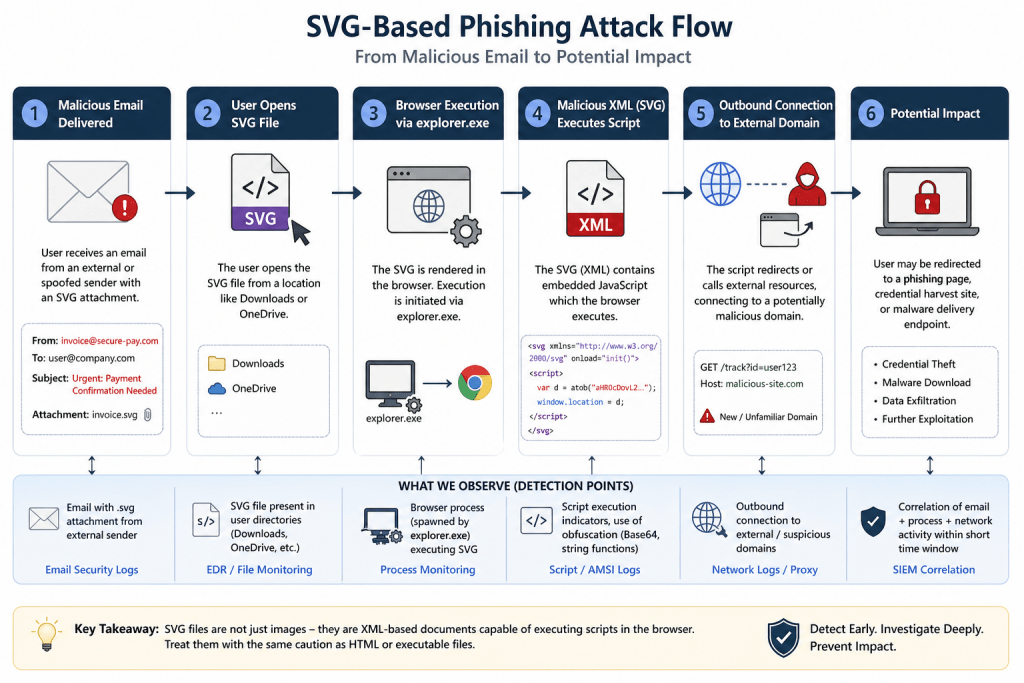
Modern phishing campaigns continue to evolve beyond traditional attachments—and this week’s threat hunt focused on one such emerging vector: SVG files embedded with malicious scripts. SVG files look harmless because they’re “just images,” but under the hood they’re actually XML documents—and that’s exactly what makes them exploitable.
Hypothesis
We investigated whether adversaries were leveraging SVG attachments as an initial access technique. The assumption: attackers deliver socially engineered emails (often finance- or urgency-themed) containing SVG files that, when opened, execute embedded JavaScript via browser processes—potentially leading to external communication with malicious infrastructure.
What We Found
Our hunt surfaced multiple inbound emails carrying SVG attachments from external or unfamiliar senders. These emails followed recognizable phishing patterns:
- Repetitive sender profiles and non-business domains
- Generic or misleading file names
- Urgent, transaction-focused subject lines designed to trigger user action
On the endpoint side, we observed user-driven execution of SVG files, where browser processes were launched via explorer.exe—confirming interaction with delivered payloads. These executions originated from typical user directories such as Downloads and OneDrive, reinforcing the likelihood of phishing-driven access attempts.
What We Didn’t Find (and Why It Matters):
Despite confirming delivery and execution stages, there was:
- No evidence of outbound communication to suspicious domains
- No indicators of obfuscated JavaScript execution
- No full attack chain correlation or post-exploitation activity
This suggests that while the initial phases of the attack chain were successful, the activity did not progress into a confirmed compromise.
Why This Hunt Matters
This exercise highlights a critical reality: not all threats need to fully execute to pose risk. Detecting early-stage attacker behavior—especially with lesser-monitored file types like SVG—provides a strategic advantage in preventing escalation.
Key Takeaways:
- SVG files are no longer “safe by default”—they can execute active content.
- User interaction remains a primary enabler in phishing campaigns.
- Early detection across email and endpoint telemetry can effectively disrupt attack progression.
Incident Response – Success Story
Device Code Phishing Attempt
Overview
SecurityHQ SOC identified a Device Code Phishing attack targeting a financial services customer leveraging Microsoft 365 authentication workflows. A major incident bridge was immediately established with key stakeholders, and incident response procedures were initiated.
The attack abused the OAuth 2.0 Device Authorization Grant flow, tricking users into entering a legitimate device login code on Microsoft’s authentication portal. This technique allows attackers to obtain valid access tokens without directly capturing user credentials.
Early detection and rapid containment ensured that unauthorized access was prevented and no sensitive data exposure occurred.
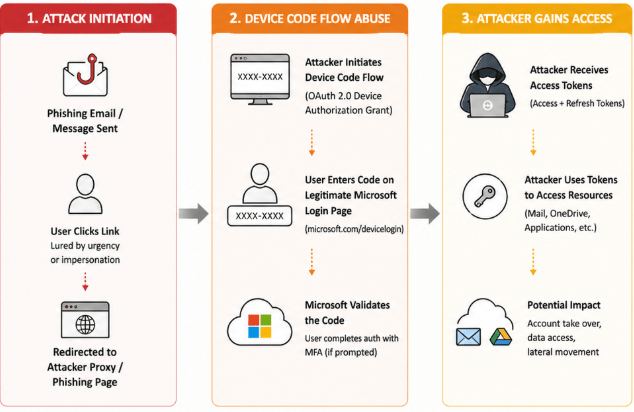
Device Code Phishing Attack Flow
What Happened
During continuous monitoring, the SOC detected suspicious authentication activity associated with device code login attempts originating from atypical locations and user agents.
The attacker initiated a device authentication flow and socially engineered the user to enter a legitimate Microsoft device code via a phishing lure (e.g., email or messaging platform). Once the user completed the authentication, the attacker attempted to gain access using the authorized session.
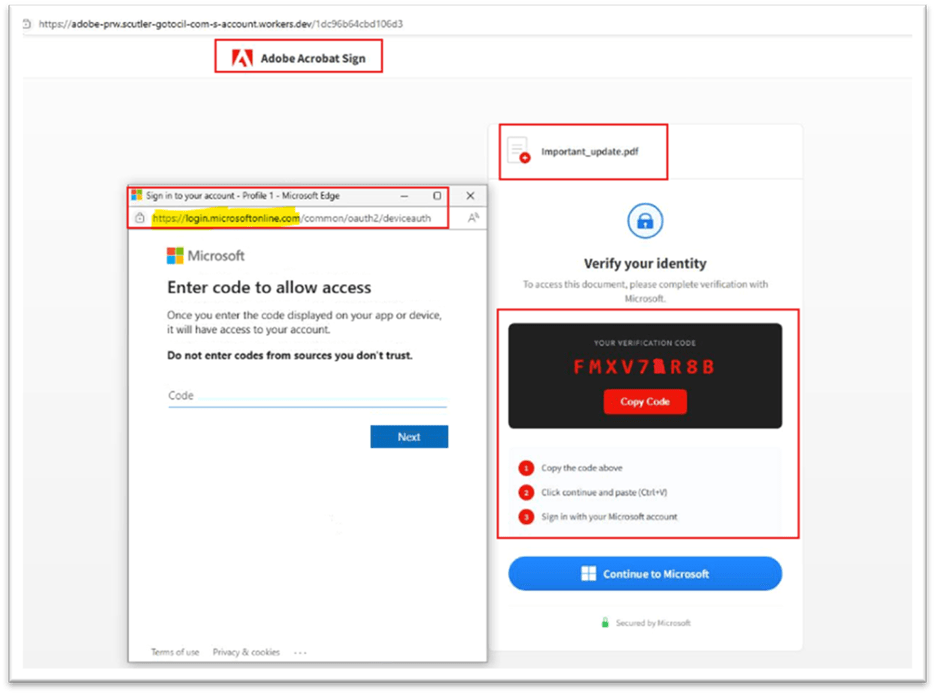
Device Code Phishing Example
Key Observations
- Device code authentication requests initiated from anomalous IP addresses
- User interaction with legitimate Microsoft login portal (microsoft.com/devicelogin)
- OAuth token issuance following successful code entry
- Suspicious sign-in patterns inconsistent with user baseline behavior
- Indicators aligned with adversary-in-the-middle (AITM) style phishing techniques
- No confirmed persistence, mailbox access, or data exfiltration
Response Actions Taken
SecurityHQ IR team successfully contained the incident and minimized impact through the following actions:
- Immediate revocation of active sessions and OAuth tokens
- Forced password reset and MFA re-registration for the affected user
- Blocking of suspicious IP addresses and device sign-ins
- Review of Azure AD sign-in logs and audit trails
- Validation of mailbox, OneDrive, and application access activity
- Implementation of conditional access policies to restrict risky sign-ins
- User awareness reinforcement regarding phishing techniques
Response Actions Taken
- Enforce Conditional Access Policies restricting device code flow to trusted devices or locations
- Disable or limit Device Code Authentication where not required
- Implement phishing-resistant MFA (e.g., FIDO2, certificate-based authentication)
- Monitor and alert on OAuth device code authorization events
- Deploy User and Entity Behavior Analytics (UEBA) for anomaly detection
- Conduct regular phishing awareness training focusing on modern attack techniques
- Enable token protection and session controls to prevent misuse of issued tokens
Authors

Let’s Talk
Global Security Operation Locations
Global Security Operation Locations
Analysts and engineers on staff
Years in business