
Managed Defense Newsletter
Managed Defense Threat Insights: August 2026 Newsletter
Cyber Defense Center – Threat Insights August 2026
SecurityHQ’s CDC Team saw three key trends in August 2026 in customer environments:
- Increased use of collaboration platforms such as Microsoft Teams for phishing and impersonation activities.
- Continued evolution of AiTM phishing campaigns targeting Microsoft 365 identities.
- Growing importance of contextual alert qualification to reduce false positives and improve analyst efficiency.
Key actions for customers include reviewing Teams external access, strengthening Conditional Access policies, reducing unmanaged device access, and modernising legacy authentication mechanisms.
high · Identity & Collaboration Security
External Teams Chat Impersonation via Microsoft Consumer Accounts
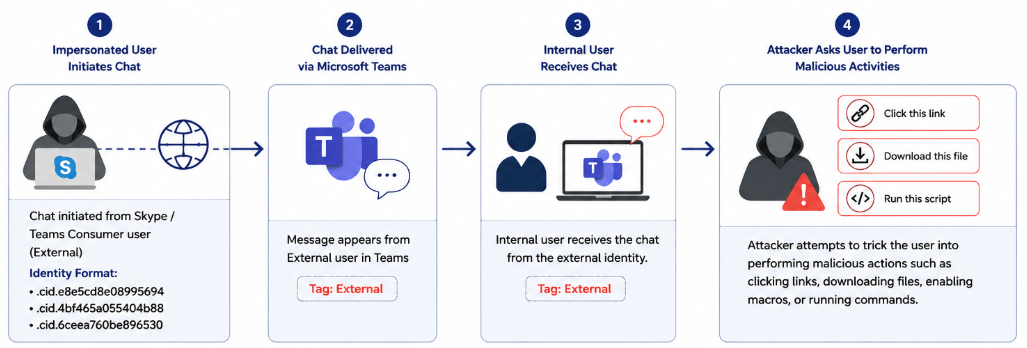
An internal user received a Microsoft Teams chat from an impersonated user, with the sender identified as ‘External’. During the investigation, the sender identities were observed in the format“.cid.e8e5cd8e08995694”, “.cid.4bf465a055404b88”, and “.cid.6ceea760be896530”.
Further analysis identified that these “.cid.” identifiers can represent Skype users or Microsoft consumer accounts communicating with organizational Teams users. The incident demonstrated how consumer identities can be used to initiate external communication and potentially impersonate legitimate users, creating opportunities for phishing, social engineering, or other malicious activity.
Remediation Steps
- Review Teams external access settings and disable communication with consumer/Skype users if not required https://learn.microsoft.com/en-us/powershell/module/microsoftteams/set-cstenantfederationconfiguration?view=teams-ps#-allowteamsconsumer
- Regularly review external collaboration policies
high · Business Email Compromise
Payroll Pirates: AiTM Phishing Campaign
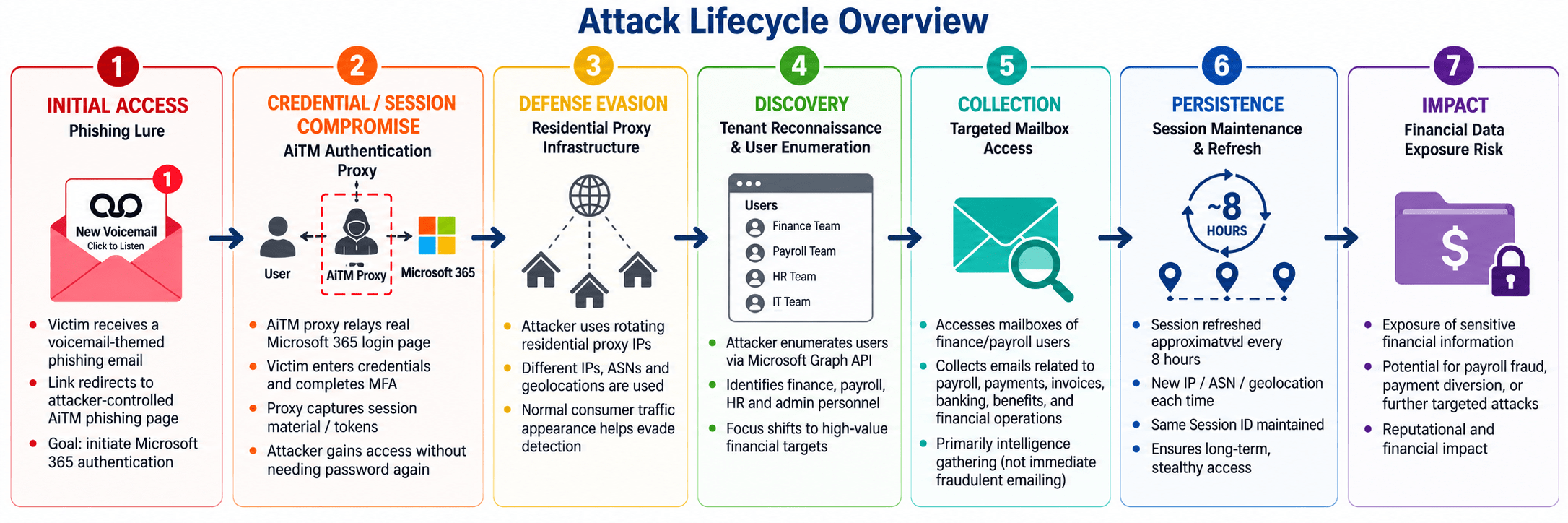
A widespread email-driven phishing campaign has been observed using Adversary-in-the-Middle (AiTM) techniques to compromise Microsoft 365 accounts. The attack uses convincing voicemail-themed phishing lures to redirect users to attacker-controlled authentication proxies that relay the legitimate Microsoft authentication process and capture authenticated session material, potentially bypassing the protection provided by conventional MFA.
Following compromise, attackers use rotating residential proxy infrastructure to maintain sessions, enumerate users associated with finance, HR and payroll functions, and selectively collect emails containing payroll, payment, banking and other financial information. The activity is notable for avoiding many traditional BEC behaviors, making behavioral correlation particularly important for detection.
Remediation Steps
- Enable enhanced conditional access policies requiring compliant device and trusted location for Exchange Online Graph API access
- Restrict sign-ins to managed devices via Conditional Access
HIGH – Social Engineering
ClickFix Attack Attempt: Malicious PowerShell Execution via Compromised Website
A potential ClickFix attack was identified when a user browsing random hotel websites was redirected to a compromised webpage hosting a malicious ClickFix lure. The webpage attempted to socially engineer the user into executing a PowerShell command on the endpoint by presenting the activity as a legitimate troubleshooting or verification action.
The investigation confirmed that the attack relied on user-assisted execution, rather than directly exploiting the endpoint. The PowerShell activity was observed executing through conhost.exe, which represents a notable variation from a previously observed ClickFix attempt. While the execution chain differed, the underlying technique remained consistent: leveraging social engineering to convince users to manually execute attacker-provided commands.
The EDR successfully identified the suspicious execution pattern associated with the ClickFix attack and blocked the PowerShell process, preventing the attacker from progressing to subsequent stages of execution
Remediation Steps
- Block or restrict unauthorized PowerShell execution.
- Deploy EDR detection rules for suspicious PowerShell execution
- Investigate compromised websites and associated IOCs and block identified domains, URLs
Threat Detection Engineering – Threat Insight August 2026
Collaboration-Layer Phishing and Alert Fidelity
This month’s release addresses two different problems. The first is an attacker shift away from email and into the collaboration layer, where a Teams message from an external consumer account can carry the same social-engineering payload as a phishing email while bypassing the scepticism users have learned to apply to their inbox. The second is our own signal quality: a review of Darktrace incident trends across monitored environments has driven a revised triage methodology aimed at raising incident fidelity.
We also share two detections that produced confirmed true-positive outcomes for customers this month.
Whats’s New This Release
- New detection rule Microsoft Teams external consumer account chat creation
- New Darktrace triage methodology and detection pack context-based incident qualification replacing single model breach scoring
- Two confirmed true-positive detections ClickFix social engineering and insider data exfiltration
New Detection: Microsoft Teams External Consumer Account Chat
| Rule name | Global: Audit and Compliance: Microsoft Teams External Consumer Account Chat Created |
| Priority | P3 (Medium) |
| Type | AUTO | New Detection |
| Scope | Global |
Overview
This use case provides coverage for new Microsoft Teams chats initiated by external consumer accounts, identified by the 8:live:.cid. identity pattern. Attackers use external Teams accounts to impersonate Help Desk, IT support, or other trusted individuals, and attempt to convince internal users to disclose sensitive information, open malicious links or files, execute commands, or grant remote access to their systems.
Because the approach arrives through an enterprise collaboration platform rather than email, it can bypass the initial scepticism users apply to unsolicited external contact. MITRE tracks the technique as T1566.003, Spearphishing via Service.
What it detects
Teams chat creation events where the initiating identity matches the 8:live:.cid. pattern, indicating a Microsoft consumer account external to the tenant.
Why it matters
Microsoft has documented this pattern as the opening stage of a full human-operated intrusion chain. In its April 2026 analysis, Cross-tenant helpdesk impersonation to data exfiltration, the Defender research team notes that a chat creation event is the reliable first-contact signal, typically followed by vishing or suspicious messages, then a remote management session. From that foothold the observed chain ran through Quick Assist remote access, DLL sideloading via signed binaries, WinRM lateral movement toward domain controllers, and data staging with Rclone to external cloud storage.
Detecting chat creation gives us visibility at the earliest point in that chain, before the user has been persuaded to grant access.
Trigger Note
The 8:live:.cid. pattern identifies a Microsoft consumer account and does not, by itself, confirm malicious activity. Alerts will be reviewed to validate the sender’s identity, conversation content, shared links or files, requested actions, and whether the communication was expected.
Methodology Update: Darktrace Incident Qualification
Review Findings
- Approximately 60% of the reviewed Darktrace incidents were classified as false positives.
- Approximately 64% of the reviewed incident volume originated from detections categorised by Darktrace as Compliance or Informational.
- Darktrace describes Informational alerts as low-level indicators or notable events that do not indicate malicious activity in isolation. Compliance alerts are primarily associated with activity that may be contrary to organisational policy or expected operating practices.
The analysis indicates that a significant proportion of current incident volume is generated from detections that provide useful supporting context, but do not always warrant creation of a standalone security incident.
The Revised Approach
Rather than relying on an individual model breach or model score alone, the revised methodology considers behaviour category, score, device type, asset context, and multiple related detections occurring on the same device. A new Darktrace detection pack has been built on this methodology.
At this stage we are not providing a fixed percentage reduction in incident volume, as the impact will depend on the Darktrace activity and configuration within each individual customer environment.
Key Benefits of the Approach
- Expected reduction in unnecessary escalations.
- Expected improvement in signal-to-noise ratio.
- Pilot outcomes from customers where tested.
Detection Wins
ClickFix social engineering
A ClickFix detection fired correctly in a customer environment and was confirmed as a true positive. The activity was identified and the affected user was protected before the technique could be completed.
Insider data exfiltration to removable media
A departing employee attempted to copy organisational sensitive files to a USB device. The detection identified the activity, the customer was notified, and the exfiltration attempt was captured.
Summary
The Teams external consumer account detection extends our phishing coverage out of the mailbox and into the collaboration layer, catching impersonation attempts at the first-contact event rather than after a remote session has been granted. The Darktrace methodology update targets the other side of the problem: making sure the incidents we do raise are worth a customer’s attention, by qualifying on behaviour category, asset context and correlated activity rather than a single model score. Both changes point the same way earlier, better-qualified signal.
Threat Management – AI Governance
Blocking Unsanctioned GenAI Traffic via EDR – Adobe Firefly Case StudyEDR Report
How SecurityHQ’sThreat Management Team used SentinelOne’s Firewall Control to restrict access to Adobe Firefly, and what EDR can and cannot do when it comes to enforcing GenAI usage policy.
What We Did?
Adobe Firefly (firefly.adobe.com, express.adobe.com, new.express.adobe.com, sensei.adobe.com) was identified as an unsanctioned generative AI service accessible directly through the browser/application, with no enterprise agreement in place governing data retention or model training on submitted content.
Rather than roll out a blanket block, the domains were added as FQDN-based block rules in SentinelOne Firewall Control. The rollout was staged, a pilot group was moved into scope first, with sample Firefly upload tests run against them to confirm the block held and that no dependent Acrobat functionality broke before wider deployment.
What EDR Can and Cannot See
| Capability | EDR Visibility |
|---|---|
| DNS resolution to the domain | Visible |
| Unencrypted or agent-decodable URL traffic | Visible |
| TLS encrypted session content (prompts, pasted text) | Not visible |
| File uploads to the domain | Not visible |
Current Visibility Limitations
Because traffic to these services is TLS-encrypted, SentinelOne can confirm that an endpoint resolved or connected to a domain, and enforce a block at that layer – but it cannot see what was submitted once a session is established. Confirming upload activity or data exfiltration requires a proxy or web gateway in the traffic path. EDR-based blocking stops access; it does not provide content-level DLP visibility on its own.
SecurityHQ Recommendations
- Treat EDR-based FQDN blocking as an access control, not a data-loss control – pair it with proxy/DLP logging where content visibility is required.
- Pilot any new FQDN block on a small, cross-OS group before full rollout, and validate that no sanctioned functionality depends on the blocked domain.
- Extend this pattern to other unsanctioned GenAI services identified through endpoint telemetry, using the same stage-then-scale approach.
Blocking unsanctioned AI access at the endpoint is a practical first control, but it works best as one layer in a broader GenAI governance approach – not a substitute for visibility into what data actually left the environment.
Threat Hunting – Hunting for Unmanaged Device Access, Credential Spraying & Legacy Authentication Abuse in Entra ID Sign-In LogsEnvironments
Hypothesis
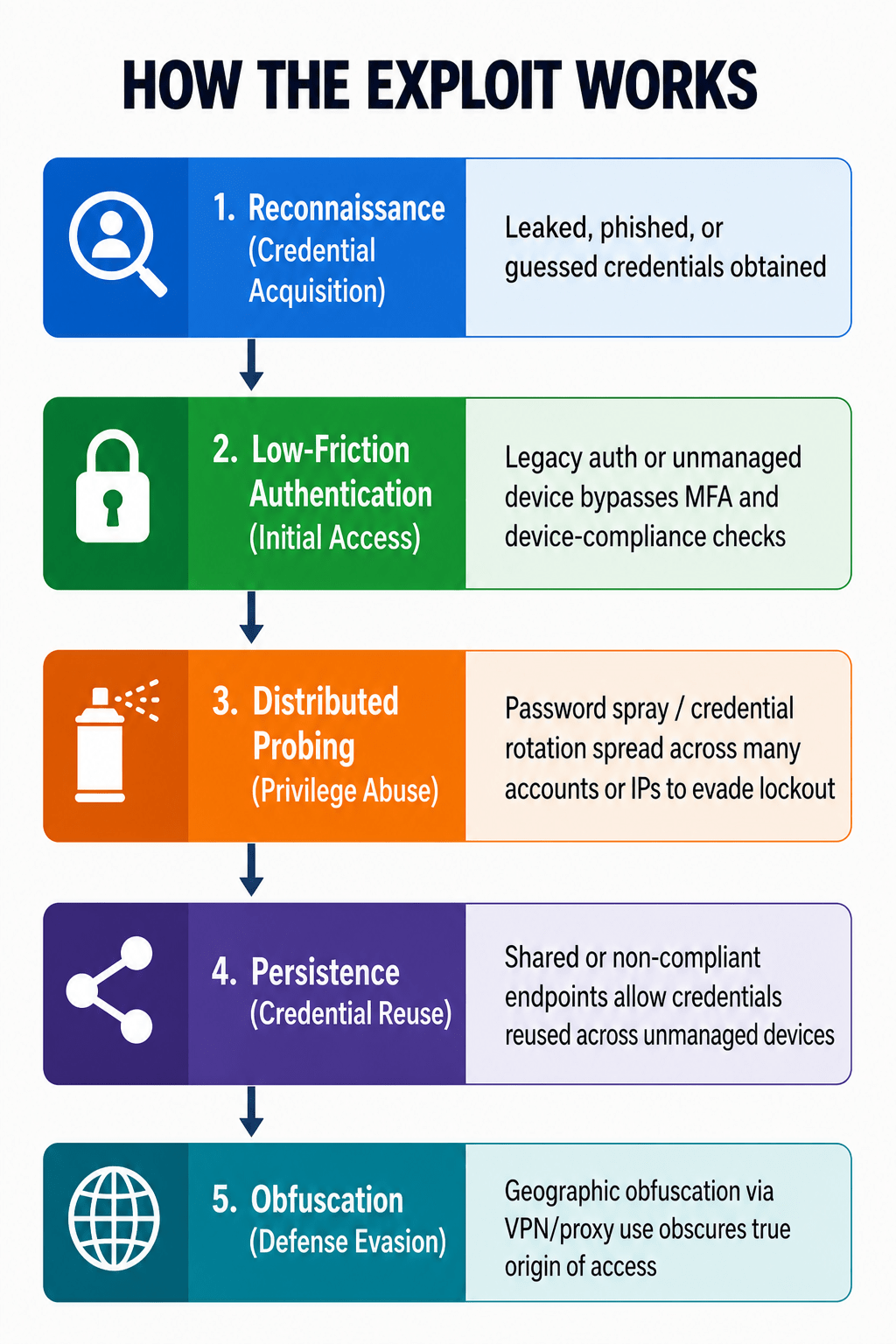
The threat hunting team investigated whether adversaries had obtained or were actively attempting to obtain valid credentials within the target Entra ID tenant by exploiting the absence of device-compliance enforcement, continued availability of legacy basic authentication, and gaps in Conditional Access coverage. The assumption driving this hunt: an adversary in possession of leaked or guessed credentials could authenticate successfully without ever needing to compromise a managed endpoint, simply by relying on accounts and protocols that fall outside device-trust and MFA enforcement, generating sign-in telemetry that looks superficially normal against conventional alert thresholds. Each technique in this hunt, unmanaged-device access, rare-geography logons, password spray, and legacy SMTP authentication, represents a distinct exposure point in the identity perimeter, and the presence of indicators across multiple points simultaneously would constitute elevated-confidence evidence of active targeting or early-stage compromise.
Why This Hunt Matters
Identity-perimeter abuse remains one of the most consistently observed precursors to account takeover and broader tenant compromise, precisely because it rarely requires exploiting a vulnerability. Legacy Basic Authentication, unmanaged BYOD access, and shared-device use are all standard, expected behaviors in most organizations, meaning that without targeted hunting, the activity is largely invisible to conventional volumetric alerting. A successful BAV2ROPC logon generates no MFA challenge to fail. A password-spray attempt spread across many accounts rarely breaches any single account’s lockout threshold. The presence of non-compliant device access and legacy protocol usage are not incidents in themselves, but they are the conditions that allow a leaked credential to become a live foothold without ever tripping a device-trust or MFA control.
What We Found
Device compliance and unmanaged access posture
Sign-in activity was analyzed across all successful logons over a 30-day window. A substantial share of the user population was identified with at least one successful sign-in from a device carrying no registered device ID, and a meaningful subset of these showed no compliant-device logon whatsoever across the entire window. The large majority of this unmanaged population authenticated from desktop or mixed desktop/mobile clients rather than mobile-only devices, indicating the exposure is concentrated in unmanaged workstation access rather than lower-risk BYOD phone use. A small number of accounts were confirmed authenticating via BAV2ROPC, Exchange Online’s legacy Basic Authentication client, which does not support MFA, all resolving to service or automation identities.
Password spray and credential-stuffing indicators
Failed sign-in activity (invalid credential, disabled account, and related result codes) was analyzed for clustering by source IP and ASN. A small number of external IP addresses not belonging to the customer’s known infrastructure were identified conducting clear multi-account targeting, with one source specifically directing the majority of its attempts against already-disabled accounts. One ASN was independently corroborated by Microsoft’s own malicious-activity classification across multiple distinct user accounts. Targeting of already-disabled accounts by an unrecognized external source is a notable finding, consistent with an attacker working from a stale or leaked user list rather than current, validated credentials.
Rare geography and shared-device access
A meaningful share of sign-in locations observed over the period showed rare access, with only a handful of users authenticating from unmanaged devices in each, including several higher-risk geographies. A small subset of accounts showed sign-ins from a wide spread of distinct countries within the 30-day window while never using a compliant device, a pattern more consistent with VPN/proxy-based access than genuine travel. Separately, one non-personal-looking account was identified authenticating from several different named employees’ individual laptops, a pattern inconsistent with either standard shared-role mailbox use or automation, and a small number of devices were identified with a high count of distinct named users each, consistent with shared production or floor terminals pending confirmation.
What We Did Not Find
Despite comprehensive coverage across the hunts, following were not observed during the hunt period:
- No confirmed successful account takeover: no account showed a successful logon immediately following a cluster of failed attempts from the flagged spray IPs or ASN.
- No mass-scripted attack-tooling signatures: no user agent strings matched known scripting or automation libraries associated with credential-attack tooling.
- No evidence of data exfiltration or lateral movement tied to the flagged unmanaged-device or shared-device accounts.
- No blank or malformed User Principal Names beyond a single GUID-format UPN, which remains unattributed pending direct confirmation in Entra ID.
Key Takeaways
- Device-compliance enforcement is the single largest gap identified.The scale of unmanaged-device access, affecting the majority of the reviewed population, means legacy protocol and device-trust gaps, not a single confirmed compromise, are the primary structural risk in this environment.
- Legacy Basic Authentication must be deprecated. Every BAV2ROPC account identified bypasses MFA by design; migrating these identities to modern authentication (OAuth 2.0) removes an entire class of exposure regardless of credential strength.
- Targeting of disabled accounts is a leaked-credential signal. An external, unrecognized source specifically probing already-disabled accounts should be treated as evidence that a stale user or credential list is circulating, warranting a broader credential-hygiene review.
- Conditional Access should be split by device type. Desktop platforms should require compliant or hybrid-joined status; mobile access, which represents the smaller and lower-risk share of this population, should be governed through app-protection (Intune MAM) policies rather than left ungoverned by the same gap.
- Shared and multi-user devices must be inventoried, not assumed. Devices and accounts showing multi-user or cross-employee access without a clear service or shared-role explanation should be formally documented as expected exceptions or escalated; ambiguity here cannot be resolved through log review alone.
End of Newsletter

Let’s Talk
Global Security Operation Locations
Global Security Operation Locations
Analysts and engineers on staff
Years in business